

New 2026 SOL-C01 exam questions Welcome to download the newest Exam4Labs SOL-C01 PDF dumps (218 Q&As)
P.S. Free 2026 SnowPro Advanced SOL-C01 dumps are available on Google Drive shared by Exam4Labs
NEW QUESTION # 107
What Snowflake parameter is configured in the Query Processing layer?
- A. The minimum and maximum serverless compute limits
- B. The sizing of virtual warehouses
- C. The minimum and maximum micro-partition limits
- D. The types of tables available in an account
Answer: B
Explanation:
The Query Processing layer of Snowflake is wherevirtual warehouses operate, so warehouse sizing parameters (X-Small to 6X-Large) fall under this layer. Warehouse size determines compute power, concurrency, and performance behavior for SQL workloads. Administrators configure warehouse size based on workload intensity, response time requirements, and cost considerations.
Serverless compute limits and micro-partition limits belong to storage and services layers. Table types (permanent, transient, temporary) are storage-level configurations, not part of Query Processing.
Thus, warehouse sizing is the correct parameter configured at the Query Processing layer.
NEW QUESTION # 108
To exclude certain columns from a SELECT query, you should:
- A. Use the EXCLUDE keyword
- B. Use the OMIT clause
- C. Use a REMOVE function on the table
- D. Explicitly list the columns you want to include
Answer: A
Explanation:
Snowflake supports theEXCLUDEkeyword to simplify queries when excluding certain columns from a SELECT * operation. SELECT * EXCLUDE (column1, column2) reduces verbosity and enhances maintainability, especially when table schemas evolve. Explicitly listing all columns is possible but inefficient. Snowflake does not support REMOVE functions for columns nor an OMIT clause. EXCLUDE is the correct and official mechanism.
NEW QUESTION # 109
You're building a Snowflake Notebook to automate data quality checks on a daily basis. You have a series of SQL queries, each representing a different quality rule (e.g., checking for null values, duplicate records, invalid date formats). You want to implement error handling so that if one quality check fails, the notebook continues to execute the remaining checks and logs the errors.
Which is the most robust approach to achieve this within the Snowflake Notebook environment, minimizing code complexity and maximizing fault tolerance?
- A. Within each SQL query, use Snowflake's ` TRY_CAST or similar error-handling functions to handle individual row errors and then aggregate the error counts at the end of the query.
- B. Create a stored procedure in Snowflake that encapsulates each quality check and handles its own error logging. Call the stored procedures sequentially from the notebook.
- C. Enable the 'AUTO_RETRY parameter at the account level, so failed queries are automatically retried after 5 seconds.
- D. Wrap each SQL query execution in a Python `try...except' block and log any exceptions to a Python list. After all checks are completed, print the list of errors.
- E. Use Snowflake's 'SYSTEM$LAST_CHANGE COMMIT _ TIME function to check if the SQL query executed successfully after each check. If not, log the error.
Answer: B,D
Explanation:
Options A and C represent the most appropriate solutions. Option A provides explicit error handling in Python, allowing the notebook to continue execution even if some SQL queries fail. It is simple to implement and offers good control over error logging. Option C encapsulates the checks in stored procedures within Snowflake. This allows for modularity and allows Snowflake to handle transaction management (e.g. error handling) for each data quality check individually, improving fault tolerance. It also allows for easier reuse and maintainability. Option B doesn't provide a direct way to determine if the query succeeded in returning the correct result; it only checks for a commit time. Option D is relevant for handling errors within the data itself, but doesn't prevent a query from failing entirely. Option E doesn't log/handle the errors; it only retries them.
NEW QUESTION # 110
A team is developing a data pipeline to load data from various sources into Snowflake. They are using external stages pointing to AWS S3 buckets and want to ensure maximum security and isolation between different pipelines accessing these stages. Which of the following security measures should they implement? (Choose TWO)
- A. Grant the 'ACCOUNTADMIN' role to all users who need to access the stages.
- B. Disable network policies on the Snowflake account to allow access from any IP address.
- C. Use separate IAM roles for each pipeline, granting each role only the necessary permissions to access its specific S3 bucket.
- D. Create separate external stages for each pipeline, each pointing to its specific S3 bucket and associated with its own IAM role.
- E. Store all data files in a single S3 bucket and grant a single IAM role access to the entire bucket.
Answer: C,D
Explanation:
Using separate IAM roles (B) for each pipeline enforces the principle of least privilege, granting each pipeline only the necessary access to its designated S3 bucket. Creating separate external stages (D) for each pipeline, linked to its specific S3 bucket and IAM role, provides isolation and prevents unauthorized access to other pipelines' data. Granting 'ACCOUNTADMIN' (A) provides excessive privileges. Storing all data in a single bucket (C) with a single IAM role increases the risk of data breaches. Disabling network policies (E) compromises overall security.
NEW QUESTION # 111
What does Snowflake UI called?
- A. Snowsight
- B. SnowGUI
- C. Snowsite
- D. SnowView
Answer: A
Explanation:
The official Snowflake web interface is calledSnowsight. Snowsight is the modern, browser-based UI that enables SQL development, Python worksheets, dashboarding, visual exploration, and account monitoring. It replaces the classic UI and is now the default interface. Snowsight provides integrated capabilities such as notebooks, data loading interfaces, dashboards, role and warehouse management, and visual query history.
Other options like Snowsite, SnowGUI, and SnowView are not valid Snowflake product names.
NEW QUESTION # 112
A data warehouse contains a table named 'ORDERS in schema `SALES'. The current owner of the `ORDERS' table is the `ANALYST role. The compliance team requires that the ownership be transferred to the 'SECURITY ADMIN' role, but without interrupting any existing queries or processes that use the table. What is the recommended approach to transfer ownership with minimal disruption?
- A. Create a new table with the same structure as 'ORDERS' , load data into it, grant all privileges to
'SECURITY_ADMIN' and users from 'ANALYST role, and then drop the original 'ORDERS table.
Finally, rename the new table to 'ORDERS. - B. Execute 'ALTER TABLE SALES.ORDERS TRANSFER OWNERSHIP TO ROLE
SECURITY_ADMIN;' during a scheduled maintenance window when no queries are running. - C. Immediately execute 'ALTER TABLE SALES.ORDERS TRANSFER OWNERSHIP TO ROLE SECURITY_ADMIN;'
- D. Create a clone of the 'ORDERS table, transfer ownership of the clone, then drop the original
'ORDERS' table and rename the clone to `ORDERS. - E. Create a view on top of the 'ORDERS' table, transfer ownership of the view to 'SECURITY ADMIN' , and then drop the original 'ORDERS' table.
Answer: C
Explanation:
Transferring ownership using 'ALTER TABLE ... TRANSFER OWNERSHIP' is a metadata operation and does not lock or significantly impact existing queries on the table. It's the most straightforward and least disruptive approach. Cloning, creating views, or recreating tables involve significant data operations and downtime, which are undesirable.
NEW QUESTION # 113
A company wants to implement row-level security in their Snowflake data warehouse to restrict access to sales data based on the user's region. They have a table 'SALES with a 'REGION' column and want to ensure that users can only see sales data for their assigned region. They plan to use row access policies for this. Which of the following steps are REQUIRED to implement this row-level security?
- A. Create a row access policy that references a mapping table or function to determine the user's allowed regions, and then apply the policy to the 'SALES' table. Also, grant SELECT on the SALES Table to the reporting role.
- B. Create a row access policy that directly embeds the region filtering logic, and then apply the policy to the 'SALES table. Grant the APPLY ROW ACCESS POLICY privilege to the users.
- C. Create a row access policy that references a mapping table or function to determine the user's allowed regions, and then apply the policy to the 'SALES' table. Grant the APPLY ROW ACCESS POLICY privilege to the users.
- D. Create a row access policy that references a mapping table or function to determine the user's allowed regions, and then apply the policy to the 'SALES' table. No additional privileges are required for the users.
- E. Create a view on top of the 'SALES' table with a 'WHERE clause that filters data based on the user's region, and then grant 'SELECT privileges on the view to the users. No Row access policy needs to be created.
Answer: A
Explanation:
Row access policies implement row-level security. The policy needs to reference a mapping table or function to determine allowed regions. Applying the policy to the table enforces the security.
Users don't need the 'APPLY ROW ACCESS POLICY privilege; this is for managing the policies, not accessing the data secured by them. Creating a view (option C) is an alternative, but row access policies are a dedicated mechanism. Embedded logic (option D) is less flexible and maintainable. Option E is best because after you create the row access policy and apply it to the sales table, any user with select on the sales table will have the Row Access Policy applied to them.
NEW QUESTION # 114
A security auditor has identified that several users have been granted the role directly. Your company's security policy mandates that 'ACCOUNTADMIN' should only be used in emergency scenarios and access should be granted temporarily through a subordinate role. Which of the following steps should you take to remediate this situation while minimizing disruption to existing user workflows? (Choose two)
- A. Create a new custom role (e.g., 'ADMIN_ROLE) and grant ` ACCOUNTADMIN' to this role. Then grant this role with 'GRANT ROLE ADMIN_ROLE TO USER
- B. Create a new custom role (e.g., 'ADMIN ROLE) and grant it all the privileges currently held by the
'ACCOUNTADMIN' role. - C. Create a new custom role (e.g., 'ADMIN ROLE) and grant it the 'ACCOUNTADMIN' role. Then grant the 'ADMIN ROLE to the users who currently have ACCOUNTADMIN'.
- D. Create a new custom role (e.g., 'ADMIN ROLE') and grant it 'OWNERSHIP on the account. Grant the 'ADMIN ROLE' to the users who currently have ACCOUNTADMIN'.
- E. Revoke the 'ACCOUNTADMIN' role from all users and inform them that they should not be using this role anymore. If they have access requirement, contact sysadmin.
Answer: A,C
Explanation:
Option A: Creating a subordinate role and granting it the 'ACCOUNTADMIN' role is the correct approach. This allows you to control access to through a more manageable role. Option D is how the grant should be implemented. Option B is incorrect because the complete set of
'ACCOUNTADMIN' privileges is complex and subject to change; using GRANT ROLE ensures the custom role always inherits the full 'ACCOUNTADMIN' permissions. Option C would disrupt users' workflows significantly. Option E OWNERSHIP on Account is not the intended role
NEW QUESTION # 115
What is the purpose of the "auto-suspend" feature in Snowflake virtual warehouses?
- A. To automatically increase the size of the warehouse during peak load
- B. To automatically reduce the number of clusters
- C. To automatically add more nodes to the warehouse
- D. To automatically shut down the warehouse after a period of inactivity
Answer: D
Explanation:
The auto-suspend feature saves compute costs byautomatically suspending a warehouse when it becomes idlefor a configured period. Since Snowflake charges for compute time while a warehouse is running, auto- suspend prevents unnecessary credit consumption by stopping the warehouse when no queries are executing.
The warehouse can resume automatically when a new query is submitted, provided auto-resume is enabled.
Auto-suspend does not change warehouse size (scaling up/down) nor adjust clusters in a multi-cluster warehouse (scaling in/out). It strictly controls when compute resources turn off due to inactivity, making it an essential cost-optimization feature.
NEW QUESTION # 116
You need to load a large CSV file (1 TB) into a Snowflake table. Which of the following methods would generally provide the fastest loading performance?
- A. Using the Snowflake web interface to upload the file.
- B. Using the 'COPY INTO' command with multiple parallel streams and a properly sized warehouse and a file format object optimized for CSV files.
- C. Using a Python script with the Snowflake Connector to insert rows individually.
- D. Using the 'INSERT INTO statement directly within a Snowflake worksheet.
- E. Using Snowpipe with a properly sized warehouse and a file format object optimized for CSV files.
Answer: B
Explanation:
The 'COPY INTO' command with a properly sized warehouse and parallel streams provides the fastest loading performance for large files. Snowpipe (option C) is also efficient, but 'COPY INTO' offers more control over the loading process. The web interface (option A) is unsuitable for large files. Python scripts with individual inserts (option B) and direct 'INSERT INTO' statements (option E) are significantly slower due to network overhead and lack of parallelism.
NEW QUESTION # 117
What is the PRIMARY purpose of the use of the PARSE_DOCUMENT function in Snowflake?
- A. To identify data that will benefit from the use of a directory table
- B. To extract text from PDF files
- C. To identify any Personally Identifiable Information (PII) in text
- D. To parse JSON data
Answer: B
Explanation:
The PARSE_DOCUMENT function is part of Snowflake Cortex AI and is designed specifically to extract text, layout information, and structured elements from unstructured documents, especially PDFs. It supports OCR-based extraction for scanned files and layout-aware extraction to preserve tables, headings, and format structure.
Its purpose is not PII detection; Snowflake does not provide built-in automatic PII identification via PARSE_DOCUMENT. It does not identify candidate data for directory tables and is unrelated to JSON parsing-Snowflake uses PARSE_JSON for JSON data.
PARSE_DOCUMENT is primarily used for workflows such as contract analysis, invoice extraction, document classification, compliance automation, and downstream AI enrichment.
NEW QUESTION # 118
You are using Snowflake to load data from JSON files stored in an external stage. The JSON files have a nested structure, and you need to extract specific fields from the nested JSON objects into separate columns in your Snowflake table. Given the following simplified JSON structure: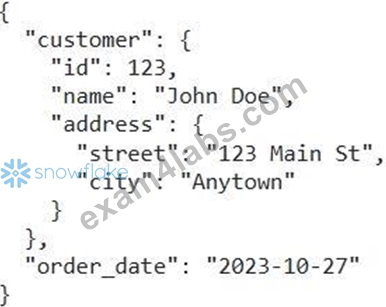
Assuming the JSON data is loaded into a VARIANT column named `RAW DATA, which of the following SQL snippets correctly extracts the customer name, street address, and order date into separate columns?
- A.

- B.

- C.

- D.

- E.

Answer: A
Explanation:
Option A is the most concise and idiomatic way to extract nested JSON fields in Snowflake using the colon C) operator. This is the preferred method for accessing elements within a VARIANT column. The other options might work in some cases, but are not the standard or most efficient approach.
NEW QUESTION # 119
You are developing a Snowpark Python application that needs to read data from an external stage. You have already created the stage named which points to an AWS S3 bucket containing Parquet files. However, when attempting to read the data using , you encounter an error indicating insufficient privileges. Which of the following actions are necessary to grant the Snowpark application the required permissions to access the data in the external stage?
Choose all that apply:
- A. Ensure that the storage integration associated with has the appropriate AWS IAM role configured with read access to the S3 bucket.
- B. Grant the 'EXECUTE TASK' privilege on the stage to the role that executes the Snowpark application.
- C. Grant the 'READ privilege on the stage to the role that executes the Snowpark application. (Note:
READ is not a real Snowflake Privilege on Stages) - D. Grant the 'USAGE privilege on the stage to the role that executes the Snowpark application.
- E. Grant the 'SELECT privilege on the underlying S3 bucket to the role that executes the Snowpark application. (Note: You can't GRANT privileges on S3 Buckets via Snowflake)
Answer: A,D
Explanation:
To access data in an external stage, the role executing the Snowpark application needs the
`USAGE privilege on the stage itself. Additionally, the storage integration associated with the stage needs to be properly configured with an AWS IAM role that has read access to the underlying S3 bucket. Granting USAGE grants the ability to 'use' the stage object in SQL statements. Without proper configuration of the IAM role and storage integration, Snowflake cannot authenticate with the S3 bucket to retrieve the data.
NEW QUESTION # 120
Which SQL command is used to create a new SCHEMA in Snowflake? (Choose any 3 options)
- A. USE SCH Schema_name;
- B. USE SCHEMA Schema_name;
- C. CREATE SCH Schema_name;
- D. CREATE SCHEMA Schema_name;
Answer: D
Explanation:
The only valid Snowflake SQL command among the options forcreating a schemais:
CREATE SCHEMA schema_name;
This command creates a schema within the currently active database. Optional modifiers like IF NOT EXISTS or OR REPLACE can be used to control behavior.
Other options:
* USE SCHEMAswitches to an existing schema; it does not create one.
* USE SCHis invalid because SCH is not a Snowflake keyword.
* CREATE SCHis invalid; SCH is not a valid abbreviation.
Thus, the only valid schema creation command isCREATE SCHEMA.
NEW QUESTION # 121
You are responsible for optimizing the data loading process into a Snowflake table 'PRODUCT REVIEWS'. The source data is in JSON format and contains nested structures. You notice that the virtual warehouse is consistently overloaded during the data loading process, and queries against the 'PRODUCT REVIEWS' table are slow after the data load. Which of the following strategies would BEST improve both the data loading performance and subsequent query performance, considering the use of INSERT statements?
- A. Increase the size of the virtual warehouse used for data loading. Use INSERT statements to load directly from the staged files using the JSON data.
- B. Create a smaller virtual warehouse specifically for data loading, and a separate, larger warehouse for querying. Use INSERT statements with 'OBJECT_CONSTRUCT to pre-process the JSON data before insertion.
- C. Use INSERT with SELECT statements to load the data and utilize the SLATERAL FLATTEN' function during the insertion process to flatten the nested JSON structure into relational columns.
Ensure the virtual warehouse used is appropriately sized and consider clustering the
'PRODUCT_REVIEWS' table based on commonly queried fields after loading. - D. Use INSERT statements to load the data into a staging table with a VARIANT column. After the load, use CREATE TABLE AS SELECT (CTAS) with 'LATERAL FLATTEN' to transform the data into a structured table. Finally, swap the original table with the newly created structured table. Use smallest virtual warehouse.
- E. Use INSERT with SELECT statements to load the data and utilize the `LATERAL FLATTEN' function during the insertion process to flatten the nested JSON structure into relational columns.Use 'auto suspend' feature on virtual warehouse to save costs.
Answer: C
Explanation:
Option C provides the most comprehensive solution. `LATERAL FLATTEN' efficiently transforms the nested JSON data during the insert process, improving query performance by eliminating the need to process JSON at query time. Using an appropriately sized warehouse and clustering the table on commonly queried fields further enhances query performance. Option A only addresses warehouse sizing but does not account for query optimization via flattening. Option B might help with resource allocation, but constructing JSON objects is not efficient. Option D does not use insert statement. Option E, turning on auto suspend will impact performance.
NEW QUESTION # 122
What is created in the Cloud Services layer of the Snowflake architecture?
- A. Metadata
- B. Micro-partitions
- C. Virtual warehouses
- D. Dashboards
Answer: A
Explanation:
The Cloud Services Layer is responsible for generating and managing metadata, including object definitions, table schemas, micro-partition statistics, column-level profiles, access control information, and query optimization metadata. Metadata plays a central role in Snowflake's performance and functionality because it informs pruning, query planning, and efficient execution.
Dashboards are created in Snowsight or external BI tools. Virtual warehouses belong to the Compute Layer, providing processing resources. Micro-partitions are created in the Storage Layer, where Snowflake automatically organizes compressed columnar data for efficient access.
Consequently, the Cloud Services Layer is where metadata-not data, not compute resources-is created and managed.
NEW QUESTION # 123
You are working with a Snowflake Notebook and need to execute a series of SQL statements that include both DDL (Data Definition Language) and DML (Data Manipulation Language) operations.
You want to ensure that if any statement fails, the entire sequence is rolled back. How can you achieve this within a single Notebook cell?
- A. Snowflake Notebooks do not support transactions within a single cell. Each SQL statement is executed independently.
- B. Prefix each SQL statement with 'TRY and include a 'CATCH' block at the end to handle any exceptions and perform a rollback if needed.
- C. Use the 'snowflake.connector' Python library to explicitly manage transactions using , followed by individual SQL statements, and or based on success or failure.
- D. Create a stored procedure that encapsulates all SQL statements and then call the stored procedure from the notebook cell. The stored procedure can handle the transaction management.
- E. Wrap the SQL statements within a 'BEGIN' and 'END' block within the cell. Snowflake Notebooks automatically treat this as a transaction.
Answer: D
Explanation:
Snowflake Notebooks' cell does not directly support BEGIN...END transaction block. While the
'snowflake.connector' can manage transactions, it typically requires multiple cells for BEGIN, statements, and COMMIT/ROLLBACK. TRY/CATCH is not a valid SQL construct for transaction management. Option D is incorrect because transactions are possible using stored procedures called from a cell. The most reliable method is to create a stored procedure (E) that handles transaction management and call it from the notebook cell. This encapsulates the logic and ensures proper rollback behavior.
NEW QUESTION # 124
You have a Snowflake table named 'CUSTOMERS' with a large amount of data. You want to create a smaller table, 'SAMPLE CUSTOMERS', containing a 10% random sample of the data from 'CUSTOMERS'. Which of the following methods is the MOST efficient way to achieve this?
- A.

- B.

- C.

- D.

- E.

Answer: B
Explanation:
Option E utilizes the 'SAMPLE clause, which is the most efficient and recommended way to create a sample of a table in Snowflake- It leverages Snowflake's internal optimizations for sampling data. Option B is also correct. Options A, C, and D are valid SQL but are significantly less efficient for sampling large datasets.
NEW QUESTION # 125
A data analyst wants to schedule a Snowflake Notebook to automatically refresh a dashboard that relies on the results of a complex data transformation pipeline. Which of the following methods are valid ways to schedule the execution of a Snowflake Notebook? (Choose all that apply)
- A. Using the Snowflake Task feature to execute a stored procedure that calls the Snowflake Notebook using the 'SYSTEM$EXECUTE NOTEBOOK function.
- B. Leveraging Snowpark Python UDFs to sequentially execute the code cells within the notebook and create a task that calls the UDF.
- C. Using the Snowflake web UI to directly schedule the notebook for periodic execution. Snowflake natively supports scheduling Notebooks in the I-Jl.
- D. Converting the Snowflake Notebook into a Python script and using the operating system's built-in scheduler (e.g., cron on Linux, Task Scheduler on Windows) to execute the script.
- E. Using an external orchestration tool (e.g., Airflow, dbt Cloud) to trigger the execution of the Snowflake Notebook using the Snowflake API or CLI.
Answer: A,E
Explanation:
Snowflake Task with `SYSTEM$EXECUTE NOTEBOOK (A) allows scheduling via stored procedures. External orchestration tools (C) can also trigger Notebook execution via API or CLI.
Snowflake does not have a nativeUIscheduling option for notebooks (B). Converting the notebook to a script and using the OS scheduler (D) is possible but complex and less manageable. UDFs can only execute simple tasks; the whole notebook cannot be implemented through UDF's (E).
NEW QUESTION # 126
......
SOL-C01 exam questions from Exam4Labs dumps: https://actual4test.exam4labs.com/SOL-C01-practice-torrent.html (218 Q&As)